
How Dewesoft Machine Condition Monitoring Works
A rise in vibration is easier to interpret when you can see what the machine was doing at the time. Comparing vibration with rotational speed, for example, helps you determine whether a peak occurs during run-up, at a particular speed or during steady operation. Historical trends help you see whether that behaviour is changing over time.
| Capability | What it helps you do |
|---|---|
| Capture synchronised measurements | Record vibration alongside speed, temperature, pressure or other operating signals so you can compare them on the same timeline. |
| Analyse vibration | Use FFT spectrum analysis to identify frequency components, order tracking to follow vibration as speed changes, and envelope analysis to investigate bearing-related vibration. |
| Review trends and configure alerts | Use Dewesoft Historian to store long-term trend data. A web client can display machine health trends and provide alerts when configured limits are reached. |
| Share data with plant systems | Make selected monitoring data available to existing systems. Depending on the configuration, options include OPC UA and access to Historian data via MQTT or the InfluxDB API. |
Explore Dewesoft’s machine condition monitoring capabilities
Machine Condition Monitoring Applications
Pump and Motor Condition Monitoring
Monitor vibration, rotational speed and temperature on pumps and electric motors. On a variable-speed machine, compare vibration at similar speeds and operating conditions to see whether it is changing over time. If vibration rises during start-up, review the run-up data to identify where the peak occurs and whether it persists at normal operating speed.
Gearbox and Conveyor Condition Monitoring
Monitor vibration on gearboxes, bearings and conveyor drive assemblies. Use vibration spectra and speed data to investigate changes associated with gears or bearings and to see whether those changes occur under particular operating conditions.
Read the vessel gearbox vibration monitoring case study
Hydro Generator Vibration Monitoring
Metromatics supplied Dewesoft hardware and software to monitor a hydro generator during run-up. The customer needed to see how quickly the generator passed through a resonant frequency during start-up.
See the Metromatics hydro-generator run-up example
In a separate case study, Dewesoft used operating data such as speed, power, flow and temperature to estimate expected vibration in a hydro generator. When the team applied its model to historical data from one event, it identified an initial deviation more than a month before vibration reached conventional alarm levels. The signal briefly returned to its normal range before further deviations appeared.
Read Dewesoft’s hydro-generator fault detection case study
Dewesoft Condition Monitoring Hardware and Software
The right configuration depends on the number and type of sensors, where the equipment is installed and how your team needs to access the data. Metromatics can help you compare distributed modules close to the sensors with a rack-based system for locations where many channels come together.
| System component | Where it fits |
|---|---|
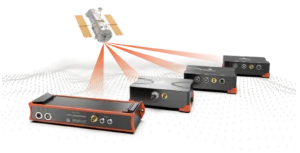
| Dewesoft IOLITE X | Distributed data acquisition over a standard TCP/IP network with PTP v2 synchronisation. Depending on the module, devices can acquire vibration and other signals, process measurements locally, and store or transmit data. |
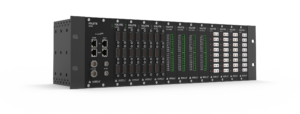
| Dewesoft IOLITE EtherCAT and IOLITE Rack | Use distributed EtherCAT modules where sensors are spread across the site, or a rack system where many channels come together. Depending on the selected module, inputs include IEPE vibration, temperature, strain, voltage, current and digital signals. |
| Dewesoft KRYPTON | Rugged data acquisition for harsh environments where modules need to sit close to the sensors. KRYPTON can share an EtherCAT measurement network with compatible IOLITE EtherCAT devices. |
| DewesoftX and Dewesoft Historian | Use DewesoftX to view live signals and analyse vibration with tools such as FFT, order tracking and envelope detection. Dewesoft Historian stores trend data for long-term review. |
View Dewesoft’s hardware and software options
Frequently Asked Questions
Can I use the sensors already installed on my equipment?
Existing sensors may be suitable. Share the sensor models and output types so we can check signal compatibility, power or excitation requirements, and whether signals can be shared from your existing monitoring system.
What should I measure alongside vibration?
Choose signals that describe how the machine is operating. Rotational speed helps when investigating run-up or variable-speed operation. Depending on the asset, load, temperature, pressure or flow can also help explain changes in vibration.
Can I start with one machine and expand later?
A system can be configured for one machine, with room to expand depending on the hardware, channel count and site layout. If you expect to add assets later, tell us where they are and which signals you expect to measure so we can take that into account when selecting the initial system.
Can the system connect to our existing SCADA or plant monitoring system?
Depending on the configuration, selected monitoring data can be shared via OPC UA or accessed from Dewesoft Historian via MQTT or the InfluxDB API. Tell us which system you use and what data it needs so we can discuss a suitable connection.
Discuss Your Condition Monitoring Requirements
Tell us which machine you need to monitor, what you already measure and what you’re trying to understand. Whether you’re investigating vibration on one asset or planning permanent monitoring across several machines, Metromatics can help you work through sensor compatibility, channel count, data acquisition and software requirements.