What Is the LevelCon Portal?
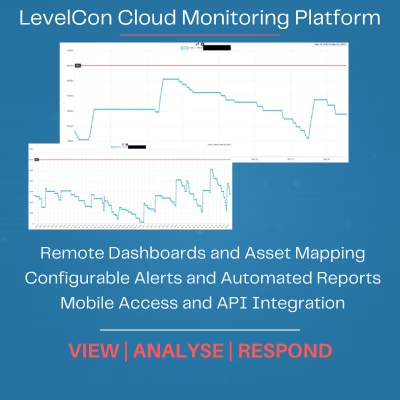
The LevelCon Portal is remote tank monitoring software that collects, displays and manages data from connected LevelCon monitoring devices.
Compatible LevelCon gateways transmit readings from tank-level sensors and other field devices to the cloud platform. The portal then converts this field data into dashboards, graphs, alerts, reports and mapped asset locations.
As a result, operators gain a central view of their tanks and monitored assets. Instead of relying solely on manual inspections, spreadsheets or readings taken at individual sites.
See our case study on Wireless Tank Level Monitoring of Bitumen.
Depending on the connected sensors and system configuration, the portal can monitor:
- Tank and vessel levels
- Liquid inventory
- Pressure
- Temperature
- Liquid flow
- Fill and consumption activity
- Sensor and device status
- Alarm conditions
- Asset locations
Monitor Multiple Tanks and Sites from One Dashboard
The LevelCon tank monitoring dashboard brings connected tanks, sensors and remote assets together within one interface. Therefore, users can quickly compare asset conditions and identify which tanks require attention.
The portal supports multi-site monitoring. Therefore, making it suitable for organisations that manage tanks across industrial facilities, customer locations, farms, utility sites or geographically dispersed operations.
Users can customise dashboard views to display the information most relevant to their role. For example, an operator may focus on current tank levels and active alarms. Whilst a manager may prefer historical usage, reports and overall asset performance.
Key Features of the LevelCon Portal
Remote Tank-Level Visibility
View current tank levels and sensor readings without visiting each location. This increased visibility helps operators prioritise site visits and respond to changing conditions sooner.
Customisable Dashboards
Choose which tanks, sensors and measurements appear on the dashboard. In addition, users can arrange information to support different operational responsibilities and monitoring priorities.
Alerts and Notifications
Configure notifications based on tank levels, sensor triggers or other defined events. The portal supports alerts by email, SMS or voice call, depending on the account and system configuration.
Consequently, responsible personnel can receive notification when a tank reaches a low, high or critical level.
Historical Data and Trend Graphs
Review historical measurements through charts and trend graphs. The portal provides access to up to three years of historical data. Therefore, helping users examine consumption, filling activity and changes in asset performance.
Automated Reports and Data Exports
Generate reports for selected tanks, sensors or time periods. Users can also schedule daily email reports and download data into spreadsheets for further analysis or recordkeeping.
GPS Asset Mapping
Display connected assets through a map-based interface. The portal shows asset locations alongside relevant monitoring information, helping teams manage tanks distributed across multiple sites.
Mobile and Web Access
Access the LevelCon Portal through a network-connected web browser or use the LevelCon mobile application for Android and iOS. Therefore, users can monitor their assets from the office or while working in the field.
Role-Based User Access
Assign access according to each user’s role and responsibilities. This approach helps organisations give employees, customers or other authorised users access to the information they need.
JSON API Integration
Use the LevelCon JSON API to transfer sensor and tank data into compatible third-party software, dashboards or business systems. As a result, organisations can incorporate LevelCon data into a broader operational workflow instead of managing it separately.
How Does LevelCon Remote Tank Monitoring Work?
The LevelCon remote tank monitoring system brings together sensors, communications hardware and cloud software.
- A sensor measures the asset: A compatible wired or wireless sensor measures tank level, pressure, temperature, flow or another required parameter.
- The gateway transmits the data: A LevelCon monitoring gateway collects the sensor reading and sends it to the cloud platform using the configured communications connection.
- The portal displays the information: The LevelCon Portal presents the data through dashboards, graphs, reports, alerts and GPS maps.
- Users respond to changing conditions: Authorised users can check current readings, review trends and take action when an alert or operating condition requires attention.
Benefits of Remote Tank Monitoring Software
Reduce Manual Tank Inspections
Remote access reduces the need to visit every tank simply to check its level. Instead, teams can use portal data to determine which assets require inspection, replenishment or maintenance.
Respond Before Tanks Reach Critical Levels
Custom alerts help users identify low or high levels before they interrupt operations. Therefore, organisations can respond earlier and reduce the risk of stockouts, overfilling or unnecessary downtime.
Improve Replenishment Planning
Historical trends and current inventory data provide better visibility for delivery and replenishment decisions. Furthermore, operators can identify consumption patterns and schedule deliveries according to actual tank conditions.
Manage Dispersed Assets More Efficiently
The central dashboard and GPS map help organisations oversee tanks across multiple customer locations or operating sites. Consequently, teams gain a clearer picture of their entire monitored network.
Create Consistent Operational Records
Reports, historical graphs and downloadable data provide a consistent record of monitored conditions. This information can support internal reporting, investigation and operational planning.
Share Relevant Information
Role-based access allows different users to view information that relates to their responsibilities. For example, a supplier and customer may use the same monitoring data to coordinate replenishment while maintaining appropriate account permissions.
Applications for the LevelCon Portal
LevelCon remote tank monitoring software can support applications involving:
- Fuel and lubricant storage
- Water and wastewater
- LPG and propane
- Oil and gas operations
- Chemical storage
- Liquid fertilisers
- Agriculture and farming
- Liquid feed
- Industrial inventory
- Generator fuel tanks
- Mobile tanks and totes
- Bulk liquid distribution
- Remote equipment and assets
The exact measurements available depend on the connected LevelCon gateway, sensor and system configuration.
Compatible LevelCon Monitoring Equipment
The portal operates as part of a complete LevelCon remote monitoring system. Depending on the application, the system can incorporate LevelCon gateways such as the F100M or F200 together with compatible wired and wireless sensors.
Metromatics can help determine the most appropriate combination of sensors, gateways, communications and portal access for the tanks or assets you need to monitor.
Why Choose the LevelCon Portal?
The LevelCon Portal combines remote asset visibility, alerts, reporting and historical information within one cloud-based monitoring platform.
In addition, its configurable dashboards, mobile access, GPS mapping and API integration allow organisations to adapt the system to different users and operational requirements. Therefore, the platform can support anything from a small group of monitored tanks to a geographically dispersed asset network.
Most importantly, LevelCon connects the field equipment and software within one remote monitoring solution.
Getting Started with LevelCon
A typical LevelCon deployment involves the following steps:
- Identify the tanks, equipment or other assets that require monitoring.
- Confirm the materials, measurements and operating conditions.
- Select suitable wired or wireless sensors.
- Select an appropriate LevelCon monitoring gateway.
- Create the portal account and connect the monitoring devices.
- Configure tank details, dashboards, users and alert thresholds.
- Begin monitoring readings, trends and events remotely.
Metromatics supplies and supports LevelCon remote monitoring technology throughout Australia and New Zealand.
Frequently Asked Questions
What is remote tank monitoring software?
Remote tank monitoring software displays tank and sensor data collected by monitoring equipment installed at the asset. Users can view readings, receive alerts, examine historical trends and manage multiple tanks without checking each location manually.
Can the LevelCon Portal monitor multiple tanks?
Yes. The LevelCon Portal can display multiple connected tanks, sensors and sites within one account. The exact system capacity and configuration depend on the selected hardware, communications and portal arrangement.
What can the LevelCon Portal measure?
The portal can display tank level, pressure, temperature, flow and other sensor data. However, the available measurements depend on the sensors and monitoring equipment connected to the system.
Can I access the LevelCon Portal from my phone?
Yes. Users can access the platform through supported web browsers and LevelCon mobile applications for Android and iOS.
Does the portal provide tank-level alerts?
Yes. Users can configure alerts based on tank-level thresholds, sensor triggers and selected events. Notification options can include email, SMS and voice calls, depending on the system configuration.
Can LevelCon data integrate with other software?
LevelCon provides a JSON API for transferring tank and sensor data into compatible third-party platforms, dashboards and business systems. Integration requirements should be assessed for each application.
How much historical data can users access?
LevelCon states that the portal provides access to up to three years of historical data. Users can review this information through graphs, reports and downloadable spreadsheets.
Does the LevelCon Portal work with wired and wireless sensors?
Yes. LevelCon monitoring gateways can collect information from compatible wired and wireless sensors. The appropriate equipment depends on the sensor output, installation and communications requirements.
Monitor Your Tanks from Anywhere
Gain remote visibility of tank levels, sensor conditions and industrial assets through the LevelCon cloud monitoring platform.
Metromatics can help you select suitable LevelCon sensors, gateways and portal services for your application.
Contact Metromatics for more information about LevelCon remote tank monitoring software in Australia and New Zealand.